DIMM.2 on the ROG Dominus Extreme: The Feature That Almost Killed My RAM
The DIMM.2 slots were honestly one of the reasons I wanted the Dominus Extreme in the first place.
Two full-size DIMM.2 cards, each capable of holding two M.2 drives — so in theory you could run two completely separate OS and storage setups off one board without touching any of the standard M.2 slots. You could have one NVMe for your daily driver, another for a VM host, two more for scratch storage, all on DIMM.2 alone. That idea genuinely ruled in my head before I actually owned the board.
Then I started using it.
What DIMM.2 actually is
If you haven’t seen one before: DIMM.2 is an ASUS-proprietary expansion card that slots into a standard DDR4 DIMM slot, using it purely as a mechanical anchor and power delivery point. The card itself holds two M.2 slots — 2242, 2260, 2280, or 22110 depending on the card revision — and connects to the board’s PCIe and SATA lanes through that DIMM slot interface.
The Dominus Extreme ships with two of them. Fully populated, that’s four additional M.2 drives, none of which occupy the board’s onboard M.2 slots, none of which block any PCIe x16 slots. On paper this is a genius solution for a workstation board that needs to do many things at once.
The catch is the “connects to the board’s PCIe and SATA lanes” part.
The lane splitting is a mess
The Dominus Extreme does not give DIMM.2 its own dedicated lanes. What you’re actually doing is sharing bandwidth with the rest of the board’s PCIe topology — and depending on which M.2 slots you populate, which PCIe slots you populate, and in what combination, you will knock slots into shared x8/x4 mode or disable them entirely.
The manual covers it. The information is in there, in those dense block-diagram pages that everyone skips. But it’s one of those things where you have to sit down with a notepad, map out every slot you intend to use, cross-reference against three different bandwidth-sharing tables, and plan the whole config before you ever install a single drive. Populate the wrong combination and you’ll come back later wondering why a slot ran at half speed or why a drive just doesn’t show up.
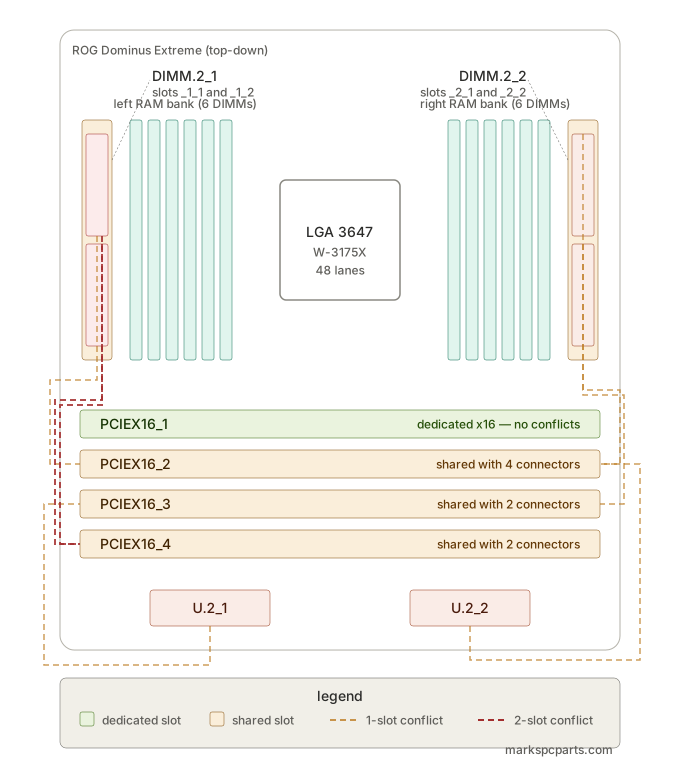
It’s not a dealbreaker. It’s annoying for something marketed as a no-compromise workstation board. You should not have to spend an afternoon with a spreadsheet just to safely install your storage.
The bigger problem: it’s a RAM heatsink blocker
Here’s the issue I didn’t anticipate at all.
The DIMM.2 cards slot into DIMM slots. The Dominus Extreme has 12 DIMM slots. Those are right next to each other. When you have a DIMM.2 card installed with two M.2 drives on it — especially the taller 22110-length drives — the whole assembly becomes a physical wall sitting perpendicular to your DIMM array.
Airflow that should be moving laterally across your memory sticks just stops. It hits the DIMM.2 card and goes somewhere else. Your DIMMs are now in a dead air zone.
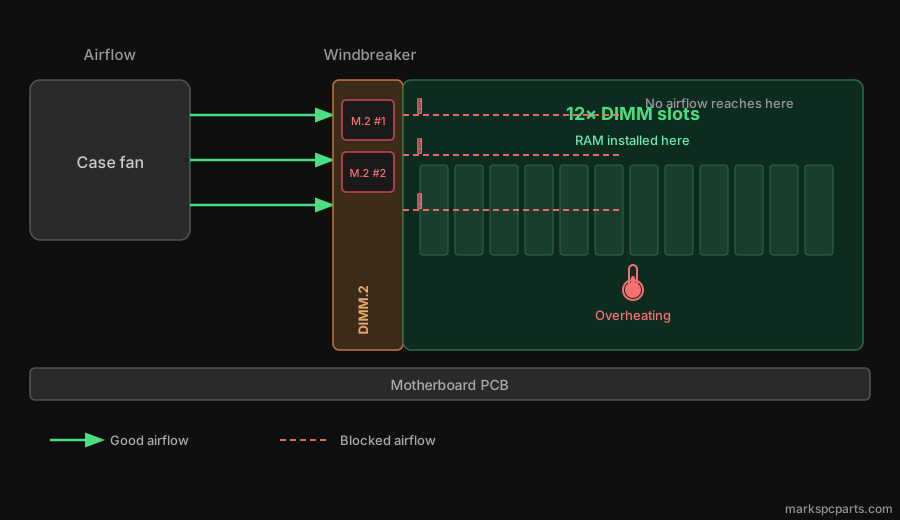
On a board with 12 DIMM slots capable of holding up to 192GB of unbuffered RAM, thermals matter. DDR4 under sustained load generates real heat. Without airflow across the sticks, that heat stays put.
My RAM started overheating. Not “running a little warm” overheating — actually unstable. System crashes, memory errors, the kind of thing that makes you wonder if you have a bad stick before you realize the whole array is just baking.
The case didn’t help
Part of this is also on my case and fan configuration at the time. The Dominus Extreme is a monster board — it needs to be in something with serious airflow, with fans positioned to move air across that DIMM region specifically. If your case fans are just doing front-to-back flow without anything targeting the memory area, the DIMM.2 blockage makes it significantly worse.
The whole cooling setup needs to be designed around this board, not just adapted from a normal ATX build.
The fix in progress
I picked up a 360mm AIO for the Dominus. The CPU is getting properly sorted, the case is getting a rethink with fan positioning that actually accounts for where the hot zones are on this specific board, and the DIMM.2 situation is getting re-evaluated — whether that means pulling one card, repositioning drives, or just improving airflow around it enough that it stops being a problem.
The goal is to revive this build properly and document the whole thing. If you’ve run into similar issues on a Dominus or any board with DIMM.2, I’d like to hear what you did about it.
Build log coming. Stay tuned.
ROG Dominus Extreme — full board details on the finds page. Background on how I got this board running in the first place: the resurrection post.
From Marks Finds
- ASUS ROG Dominus Extreme — Motherboard
- Intel Xeon W-3175X — CPU